
How to track migraines in Apple Health on iPhone
Apple Health has no migraine type, so you log a headache with a severity and times. How to add one, what Migraine Tracker writes, and the iOS 27 choice.
The short answer
Apple Health has no Migraine type, so you log a migraine as a Headache symptom: in Health, tap Browse, then Symptoms and Headache. Each entry is a severity, from Not Present to Severe, with a start and end time, and has no field for notes, medicines or triggers.
Migraine Tracker for iPhone and Apple Watch can write these entries, one each time a live attack ends. Its 0 to 10 pain level becomes Mild (0 to 3), Moderate (4 to 6) or Severe (7 to 10). On iOS 27, Health asks how much past data the app may read. Choose All Recorded Data and Future Data if the app’s cycle tracking should see periods from more than 30 days back.
What a Headache entry in Apple Health records
A Headache entry in Apple Health holds three things: a severity, a start time and an end time. Health also shows which app saved it. Migraine Tracker keeps more detail with each attack, and only the severity and the times go to Health.
| Detail | Headache entry in Health | Attack in Migraine Tracker |
|---|---|---|
| Severity | Not Present, Present, Mild, Moderate or Severe | Pain from 0 to 10 |
| Start and end | Date and time | Date and time |
| Symptoms and triggers | No field | Chosen from lists |
| Medicines | No field | Recorded with the attack |
| Notes | No field | Free text |
Other symptoms, such as Nausea, Vomiting, Dizziness and Fatigue, are separate types in Health, logged as separate entries rather than as part of the headache. Apple’s list of symptom types for Health has 39 entries, and none of them is migraine.
Log a migraine as a headache in Apple Health
You can add a headache to Apple Health by hand in five steps. These are the screens in iOS 27.0, and Apple describes the same steps for other Health data.
- Open the Health app and tap Browse.
- Tap Symptoms, then Headache. You may need to scroll to find both.
- Tap + at the top right to add data.
- Choose a severity: Not Present, Present, Mild, Moderate or Severe. Present is ticked until you choose another.
- Set when it Starts and Ends, then tap the tick at the top right to save it.
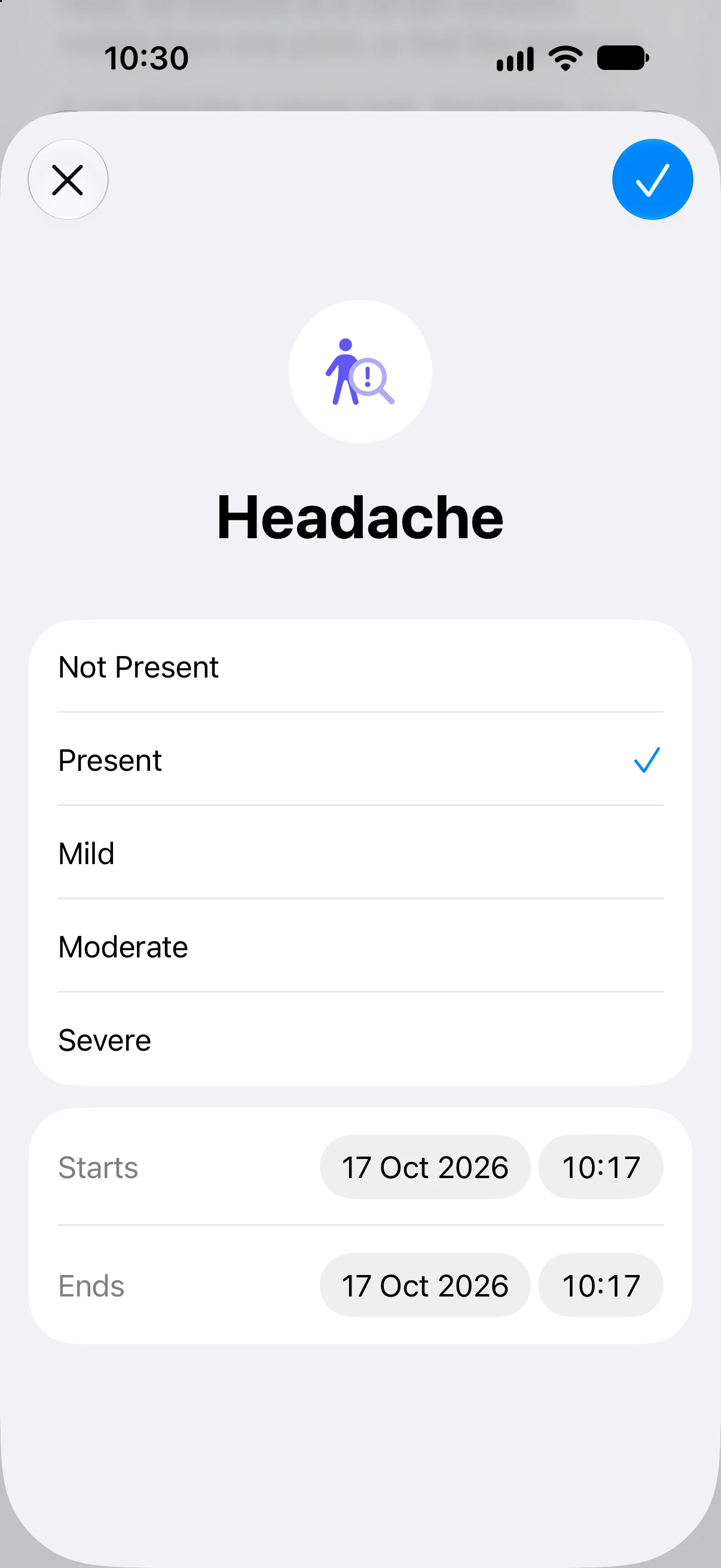
A Headache entry has no pain scale from 0 to 10, and no field for what you took or what you think set the headache off. If you want those details for an appointment, keep them in a migraine diary.
Connect Migraine Tracker to Apple Health
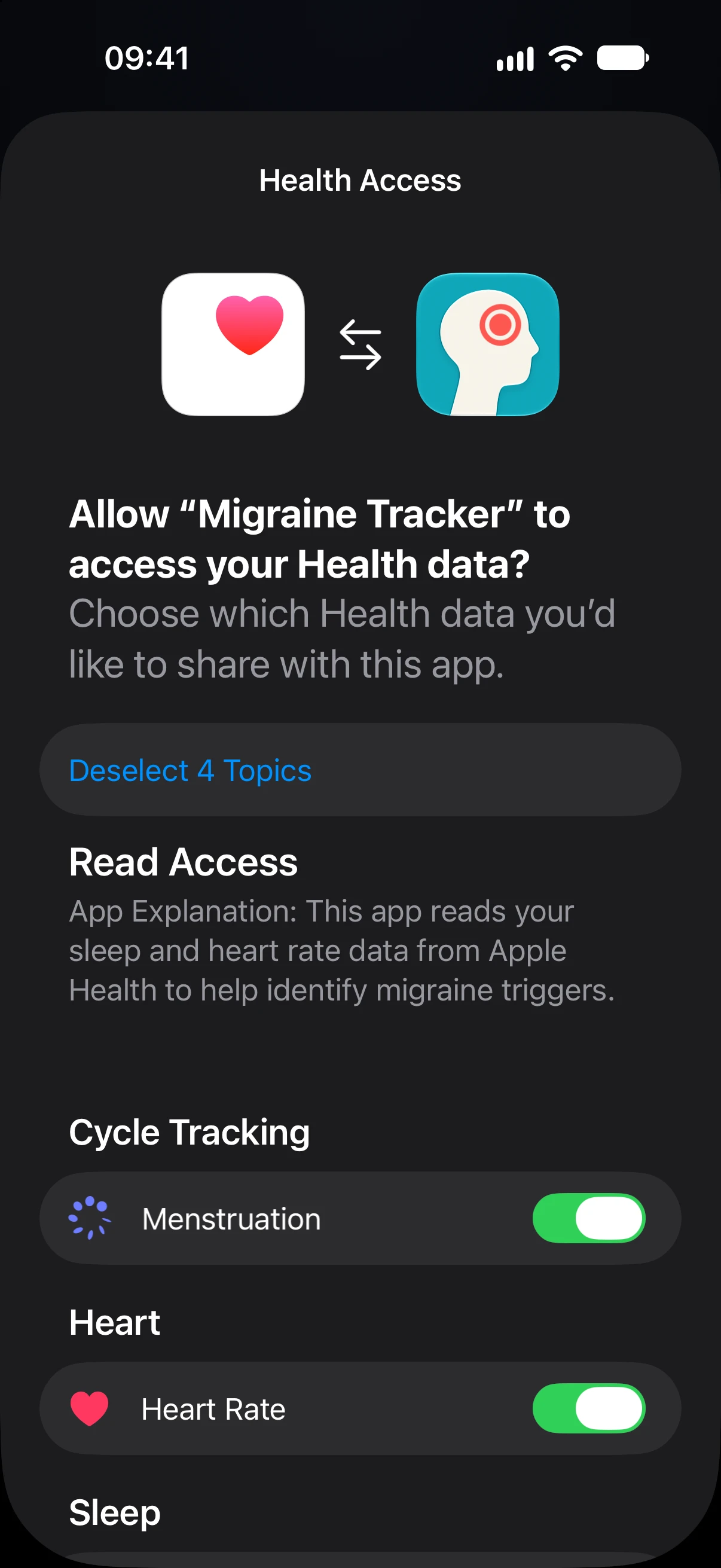
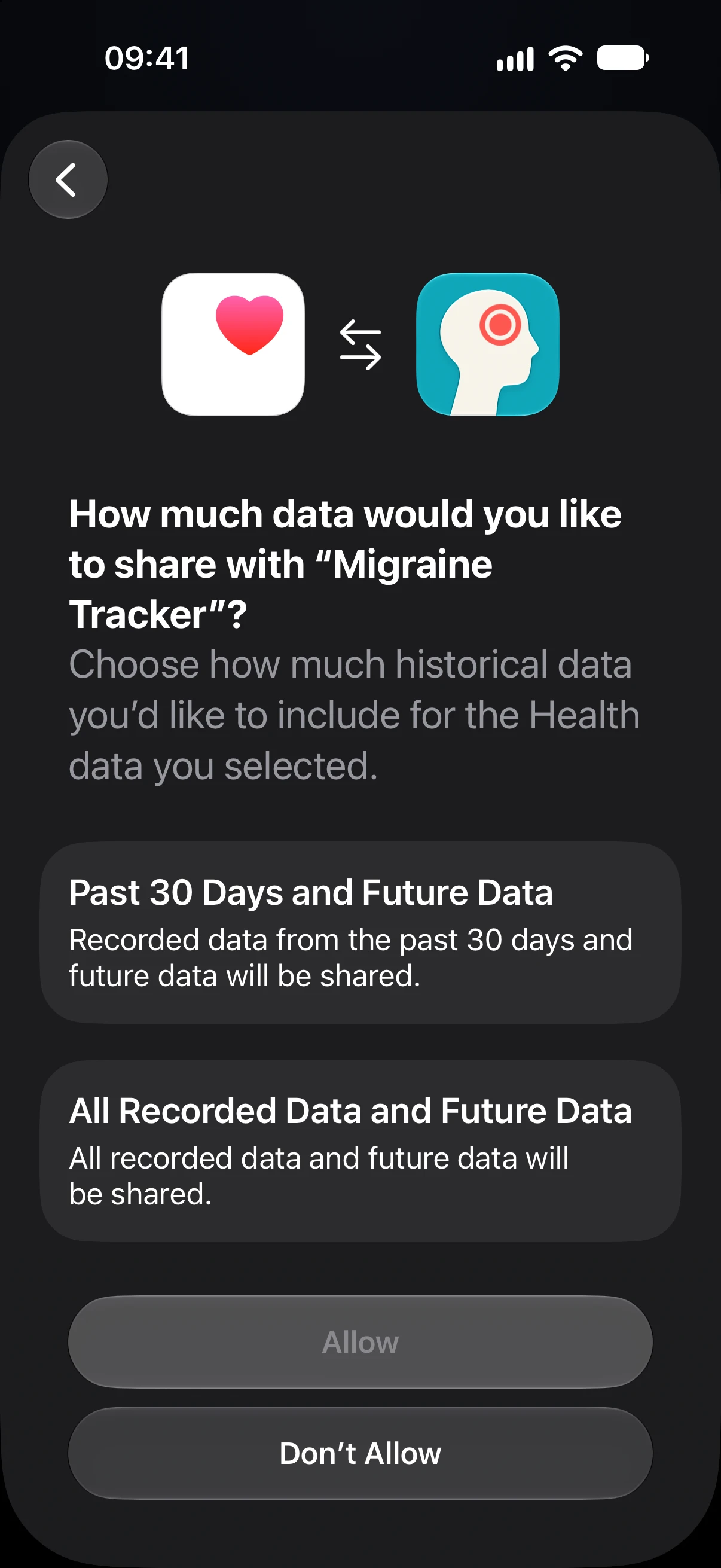
The Migraine Tracker iPhone app asks for Health access once, at the Connect Health step when you first open it. On iOS 27 the request has two pages: first the types of data, then how much of your past data to share.
- On Health Access, turn on the types you want to share, or tap Select All 4 Topics. The app asks to read Menstruation, Heart Rate and Sleep, and to write Headache.
- Tap Continue.
- Choose Past 30 Days and Future Data or All Recorded Data and Future Data. Allow stays grey until you choose one. Then tap Allow.
| Health data | Access | What the app uses it for |
|---|---|---|
| Headache | Write | One entry each time a live attack ends |
| Sleep | Read | Last night’s sleep, when available, saved with attacks you start as they happen and shown in their details. The sleep card on Today is part of Premium. |
| Menstruation | Read | Cycle phases on the History calendar, if you turn on cycle tracking. It looks back 12 months. |
| Heart Rate | Read | On iPhone, only the Heart Rate status in the app’s settings. Heart rate during an attack comes from the Apple Watch app. |
With Premium, Migraine Tracker on Apple Watch asks separately, on the watch, to read heart rate, heart rate variability (HRV) and sleep.
If you tap Don’t Allow, the iPhone app does not ask again. You can still turn access on later: open Settings, then Privacy & Security, Health, and Migraine Tracker under Apps. Migraine Tracker keeps the Health values it reads on your devices. It does not send them to its developer or store them in iCloud, as its privacy policy explains.
How much past data to share
For Migraine Tracker, choose All Recorded Data and Future Data if you use its cycle tracking. Past 30 Days and Future Data is enough for the sleep it saves with new attacks and for writing Headache entries.
Since iOS 27, Health asks how much of your past data an app may read. Both choices share new data from then on. They differ in how far back the app can see.
- Past 30 Days and Future Data: the app can read what was recorded in the 30 days before you allowed access, and anything after. Apple’s developer documentation tells apps to treat data before that date as unknown.
- All Recorded Data and Future Data: the app can read your whole history of the types you allowed.
Migraine Tracker’s cycle tracking looks for periods logged in Health over the past 12 months. With 30 days, it may find only one period. It then uses the default cycle length, 28 days unless you change it, until more periods are logged in Health. The period tracking guide explains how the app estimates phases. Migraine Tracker 1.0.9 does not show which option you chose.
You can widen access later. Open Settings, then Privacy & Security, Health, and Migraine Tracker under Apps. Tap a type the app reads, such as Menstruation, and choose Full Access. The page also offers None and Limited Access, and Limited Access shows the date it starts from.
When Migraine Tracker writes to Apple Health
Migraine Tracker writes to Health only when a live attack ends, whether you started it in the app, on Apple Watch or with Siri. You end it by tapping Stop during the attack, from its details in History, or on Apple Watch with Premium.
| Pain level in the app | Severity in Health |
|---|---|
| 0 to 3 | Mild |
| 4 to 6 | Moderate |
| 7 to 10 | Severe |
This conversion is Migraine Tracker’s own rule, because Health has no 0 to 10 scale. A pain level of 0 still becomes Mild, since the app writes an entry only for an attack.
- One entry per attack: from the attack’s start to its end, with the pain level it had when it ended. If no pain level was set, the entry is Moderate.
- Attacks added afterwards: attacks you add with past times are not written, and neither are later edits. Deleting an attack in the app does not delete its Health entry.
- Editing a running attack: saving changes to an attack that is still running also ends it, and no Health entry is written. To end an attack, use Stop.
- Very long attacks: if an attack runs for more than 14 days, for example because it was never ended, the app does not write it.
- Headache switched off: nothing is written if Headache is switched off for Migraine Tracker.
A worked example
In a test in the iOS 27.0 simulator, with fictional data, an attack was started in Migraine Tracker at 09:13 on Saturday 17 October 2026, with the pain set to 6, and ended an hour later. Health then showed one Headache entry: Moderate, from 09:13:48 to 10:13:49, with Migraine Tracker as its source.
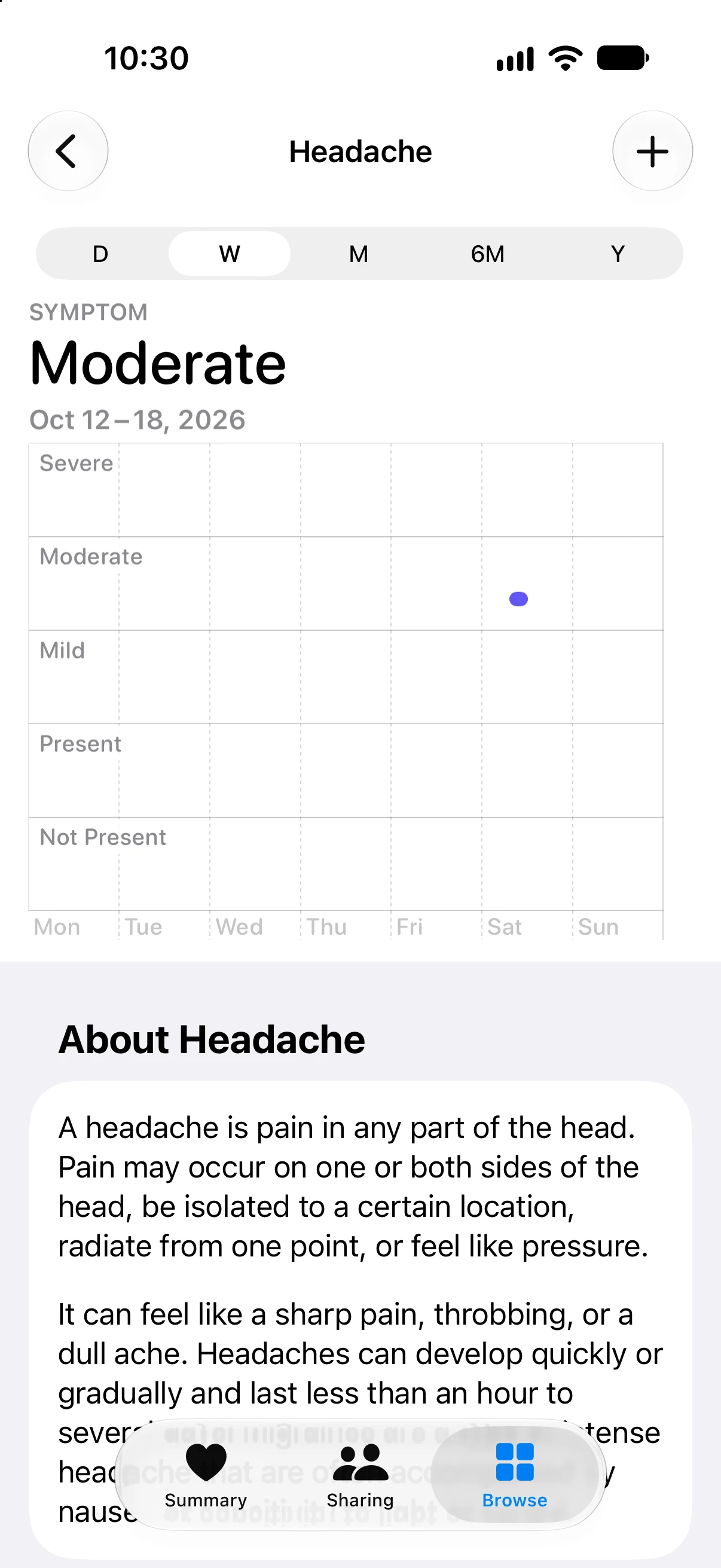
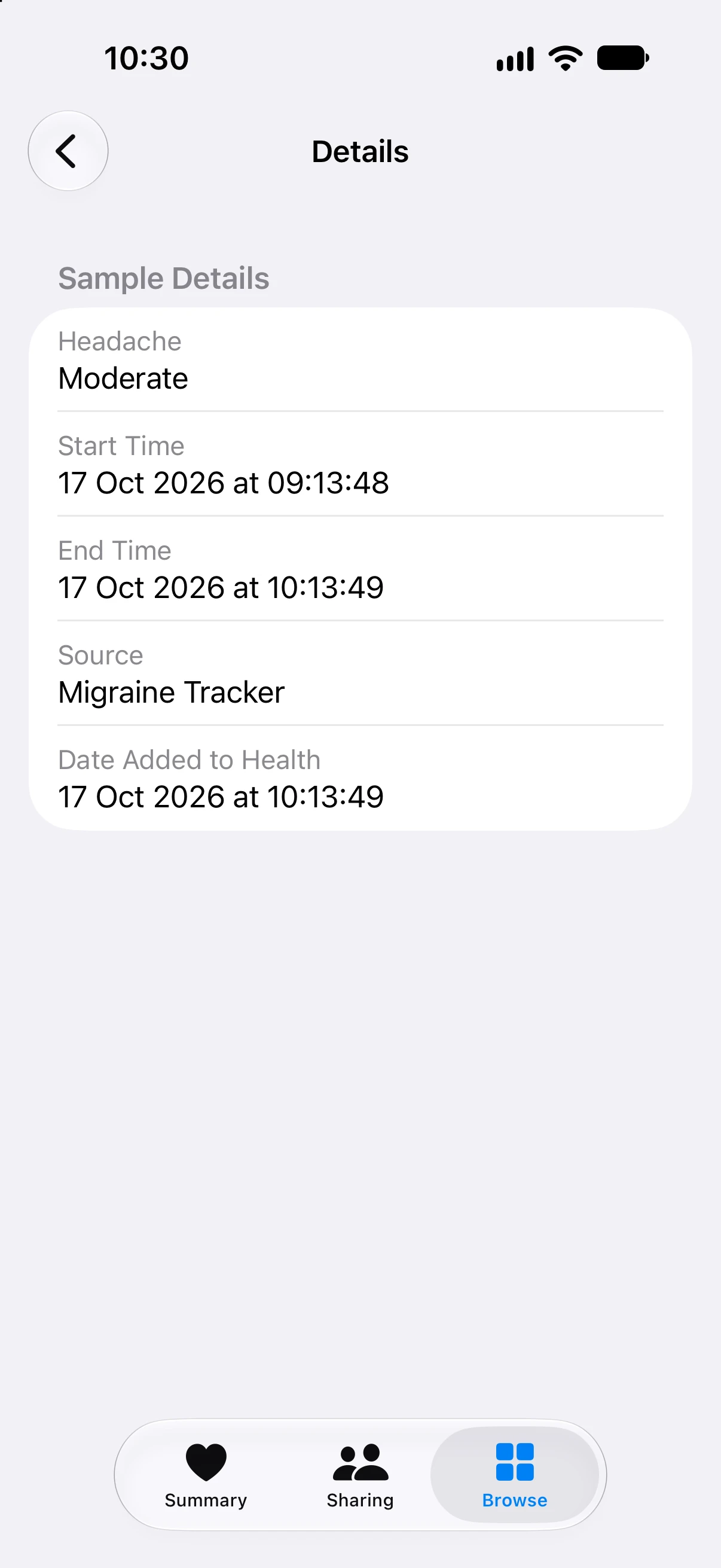
Pain 6 is in the 4 to 6 band, so the entry is Moderate. Any symptoms, triggers, medicines and notes recorded with the attack stay in Migraine Tracker, where they can go into a PDF report with Premium.
Check, change or delete Headache entries
All Headache entries, whether Migraine Tracker wrote them or you added them by hand, are in one place in Health: Browse, Symptoms, Headache.
- To see your entries, switch between D, W, M, 6M and Y for a day, week, month, 6 months or year. Scroll down and tap Show All Data for a list, then tap an entry to see its start, end and source.
- To see which apps write them, scroll to Data Sources & Access at the bottom of the Headache page. Migraine Tracker is listed under Data Sources.
- To delete an entry, open Show All Data, tap Edit, delete the entry with the red button next to it, then tap the tick. Apple notes that if your Health data syncs with iCloud, deleting it on one device removes it from your other devices too.
- To change access, open Settings, then Privacy & Security, Health, and Migraine Tracker under Apps. Headache has its own switch. Each type the app reads opens a page with None, Limited Access and Full Access. Turn Off All is at the top.
Changing an attack in Migraine Tracker does not update Health. If you correct an attack’s times or pain later, delete the Health entry if it is now wrong; the app does not write a new one.
Sources
- Apple Support: Manage Health data on your iPhone, iPad or Apple Watch (published 15 September 2026)
- Apple Developer: Symptom type identifiers, HealthKit
- Apple Developer: getEarliestAuthorizedSampleDate (HealthKit, iOS 27)
Sources checked on 17 October 2026. Health screens checked in iOS 27.0 in a simulator, with a fictional test attack.
Health screens checked in iOS 27.0, and app details against Migraine Tracker 1.0.9, on 17 October 2026. The Health screenshots show a fictional test attack recorded in a simulator. This guide explains record keeping, not medical advice. Apple’s pages explain the Health app and do not endorse Migraine Tracker.